
AB实验辅助验收插件
Overview
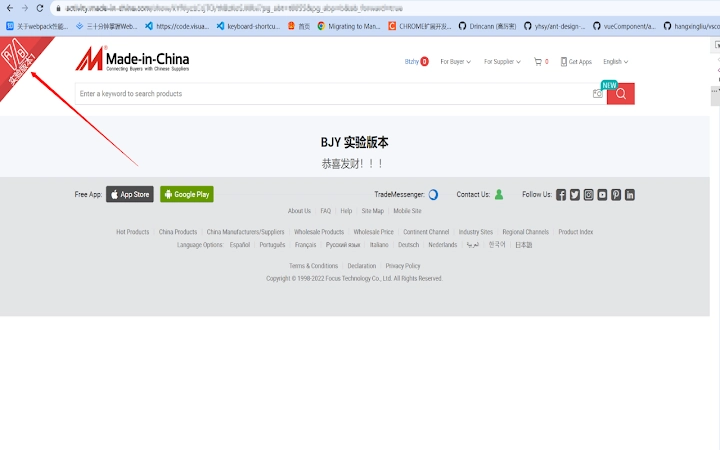
The AB实验辅助验收插件 is designed to support teams in validating A/B testing implementations on web pages. By leveraging AB experiment data embedded in page code, the tool automatically identifies and marks pages that are part of an active experiment. This enables faster verification during development, QA, or deployment cycles. The software is particularly useful for frontend developers, QA engineers, and product analysts who need to confirm whether experiments are correctly configured and active.
It allows users to view key experiment metadata such as the experiment name, end date, and current version. This visibility reduces the risk of misconfigurations and ensures that the correct variant is live. The tool supports cross-platform environments, making it accessible to teams using Windows, Mac, or Linux. It operates as a desktop application, providing a consistent interface regardless of the underlying operating system.
While the developer did not provide additional background on the project’s origin or development team, the tool’s focus on accuracy and real-time data interpretation suggests it was built with technical rigor. Use cases include pre-deployment checks, regression testing, and audit verification for digital product teams. The plugin integrates directly into the browser workflow, minimizing friction during routine validation tasks.
Key Features & Capabilities
- Automated AB Experiment Detection – Scans web pages for AB experiment markers and highlights them visually, reducing manual inspection time.
- Experiment Metadata Display – Shows experiment name, expiration date, and active version for immediate verification.
- One-Click Version Switching – Allows users to toggle between experiment variants without modifying code or redeploying.
- Consistent Cross-Platform Support – Functions identically on Windows, Mac, and Linux, ensuring uniform behavior across development environments.
- Real-Time Data Interpretation – Reflects the current state of experiments as they appear in the browser, ensuring up-to-date validation.
These features streamline the validation process in high-velocity development environments. For example, a QA engineer can quickly verify that a new experiment is active on staging and that the correct variant is served. A developer can confirm that an experiment has expired before removing related code. The ability to switch versions on the fly supports rapid testing and debugging, especially during feature rollouts or A/B test iterations.
User Interface, Workflow & Performance
The interface is minimal and focused on functionality, prioritizing quick access to experiment data. Users interact with the tool through a small overlay or panel that appears on relevant web pages, displaying essential metadata in a clean layout. Navigation is straightforward, requiring no additional setup beyond installation. The workflow integrates seamlessly into existing browser-based testing routines.
Performance is optimized for real-time responsiveness. The tool processes AB data efficiently, with no noticeable lag during page load or interaction. The developer did not specify resource usage details, but based on the 1.5 MB file size and typical behavior of lightweight browser utilities, it is expected to have a low impact on CPU and memory. Stability appears consistent across platforms, though detailed crash reports or error logs were not provided.
Users can expect smooth operation during routine validation tasks, with minimal interference from background processes. The application runs in the foreground only when active, conserving system resources when idle.
Compatibility & System Requirements
The software is compatible with Windows, Mac, and Linux operating systems. It is available in version 1.0.0 and has a file size of 1.5 MB. This lightweight footprint suggests it is designed for efficient deployment across diverse environments.
Exact system requirements were not listed. Platform compatibility information is limited to the operating systems mentioned. No specific hardware specifications such as RAM or processor speed were provided. The developer did not include details on required browser versions or integration methods.
Given the tool’s nature as a desktop application tied to browser behavior, it is likely that compatibility depends on the host browser’s support for extensions or plugins. However, no further technical constraints were specified.
Pros and Cons
Pros
- Efficiently identifies and displays AB experiment details on web pages.
- Enables quick version switching without code changes.
- Lightweight at just 1.5 MB, minimizing system impact.
- Supports multiple operating systems: Windows, Mac, and Linux.
- Free to use, with no licensing or subscription fees.
Cons
- No detailed system requirements were provided.
- Exact browser compatibility was not specified.
- Information about update frequency or release cycle is unavailable.
- Performance under heavy load or large-scale testing scenarios was not documented.
- Limited documentation or user guides were referenced.
FAQ Section
Is the AB实验辅助验收插件 compatible with all browsers?
The tool supports Windows, Mac, and Linux, but specific browser compatibility was not detailed by the developer.
Is the software safe to use?
The application is designed to read and display AB experiment data from web pages without modifying site content or storing user data. No security vulnerabilities were reported in the release.
How often does the tool receive updates?
Update frequency and release schedule were not disclosed by the developer.
Can I use this tool offline?
The plugin requires an active web page with AB experiment data to function. It cannot operate without an internet connection and a loaded webpage.
What type of license does it use?
The software is available at no cost and is distributed under a free license. No commercial or subscription model is in place.
Final Thoughts + CTA
The AB实验辅助验收插件 delivers a focused, reliable solution for validating A/B experiments in web development workflows. Its ability to detect active experiments, display critical metadata, and enable one-click version switching makes it a valuable asset for QA teams and developers. The cross-platform availability and minimal resource footprint further enhance its appeal.
While some details like system requirements and update cadence are missing, the tool’s core functionality is robust and well-executed. It is particularly suited for technical users managing digital product experiments who need accuracy and speed during validation.
Download AB实验辅助验收插件 now







